参照:http://blog.51cto.com/zero01/2064660 .
先决条件:
Digitaloean vps centos7.5
curl "https://bootstrap.pypa.io/get-pip.py" -o "get-pip.py"
python get-pip.pypip install --upgrade pippip install shadowsocksvi /etc/shadowsocks.json
内容如下:
{
"server":"0.0.0.0",
"server_port":8388,
"local_address": "127.0.0.1",
"local_port":1080,
"password":"***",
"timeout":300,
"method":"aes-256-cfb",
"fast_open": false,
"workers": 1
}
vim /etc/systemd/system/shadowsocks.service 内容如下:[Unit]
Description=Shadowsocks
[Service]
TimeoutStartSec=0
ExecStart=/usr/bin/ssserver -c /etc/shadowsocks.json
[Install]
WantedBy=multi-user.targetsystemctl enable shadowsockssystemctl start shadowsocks
添加
firewall-cmd —zone=public –add-port=80/tcp –permanent (–permanent永久生效,没有此参数重启后失效)
重新载入
firewall-cmd –reload
rpm --import https://www.elrepo.org/RPM-GPG-KEY-elrepo.org
rpm -Uvh http://www.elrepo.org/elrepo-release-7.0-2.el7.elrepo.noarch.rpm
yum --enablerepo=elrepo-kernel install kernel-ml -y
egrep ^menuentry /etc/grub2.cfg | cut -f 2 -d \'
grub2-set-default 0 //后面那个数字视情况改变
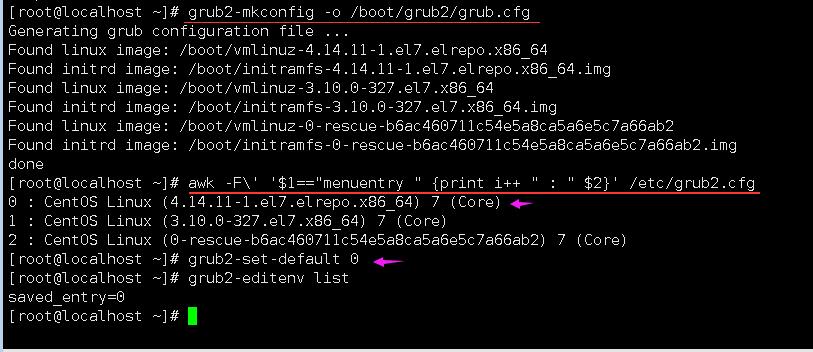 reboot
uname -r
reboot
uname -r
vi /etc/sysctl.conf
追加:
-------------------------------------------------------
net.core.default_qdisc = fq
net.ipv4.tcp_congestion_control = bbr
-----------------------------------------------------
sysctl -p
要输出这些:
------------------
net.core.default_qdisc = fq
net.ipv4.tcp_congestion_control = bbr
----------------
sysctl net.ipv4.tcp_available_congestion_control
输出应为:
---------------
net.ipv4.tcp_available_congestion_control = bbr cubic reno
-----------------
lsmod | grep bbr
输出应为:
---------------
tcp_bbr 20480 2
------------------
好,完成了